



Sim: AI Automation Finally Gets an Operating Layer
github.com/simstudioai/sim | License: Apache-2.0

A lot of AI automation still looks impressive right up until the second handoff. One model drafts the email, another checks a spreadsheet, a third hits an API, and suddenly the whole thing feels like duct tape with a chatbot attached. That gap is exactly where Sim gets interesting. Instead of treating agents like isolated demos, Sim treats them like parts of a real system, with workflows, state, permissions, and integrations that can actually survive contact with a business process. That is the difference between AI theater and software people might run every day.
The Drop: When Agent Demos Meet Real Work
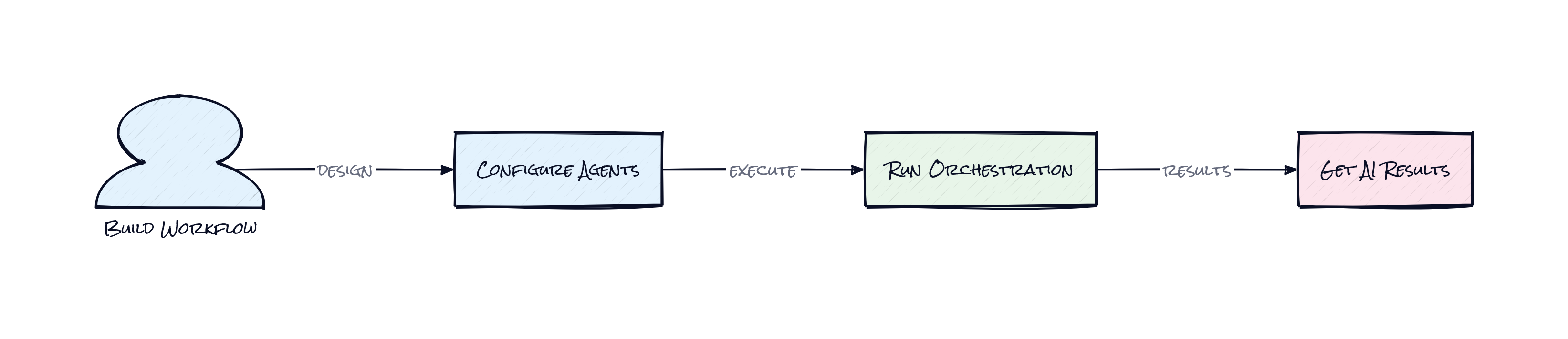
Plenty of agent tools can show a polished demo on a landing page. Fewer can answer the boring but expensive questions, like what happens when a workflow branches, when an approval step needs access control, when a retrieval block needs grounded context, or when a human has to jump in without breaking the whole chain.
Sim exists because “build an AI agent” turned out to be the easy part. The hard part is orchestration. Teams want an agent that can pull from a vector store, call external services, route outputs to the next step, and keep the whole thing visible in one place. Otherwise every automation becomes a fragile stack of prompts, webhooks, and custom glue.
That frustration is familiar to anyone who has watched no-code automation products stretch into AI territory. The interface might look simple, but under the hood the work is messier: model switching, tool permissions, persistent workflow state, and failure recovery. Sim is going after that messy middle. Not the chatbot, the system behind the chatbot.
The Stack: TypeScript All the Way Down
Underneath the canvas, Sim runs on Next.js for the app layer, React for the interface, and PostgreSQL with pgvector for persistence plus retrieval. The project is written in TypeScript, uses Bun and Node in development, and includes a realtime socket service so workflows feel live instead of request-response dead.
The Sauce: The Canvas Is Not the Product
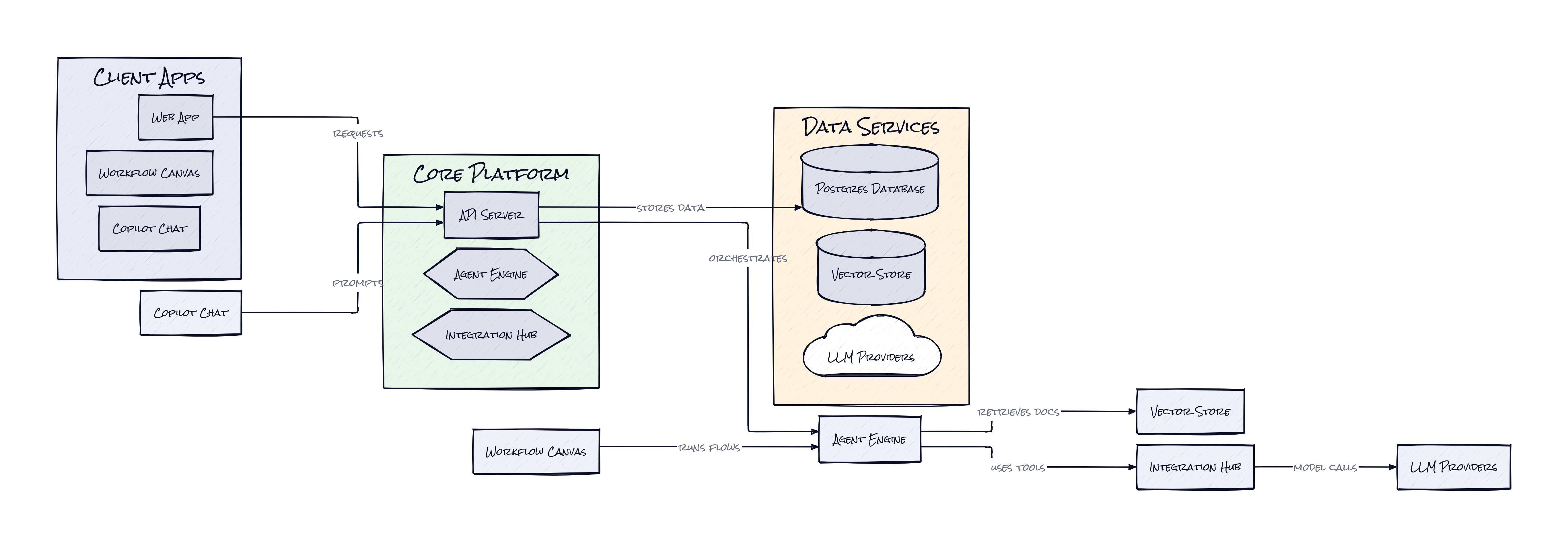
What makes Sim notable is its normalized workflow persistence, which stores automations as structured data rather than as one giant blob the app happens to understand. That sounds abstract, but it matters a lot. A visual workflow editor is easy to fake. A workflow system that can save, reload, authorize, migrate, branch, and collaborate across workspaces is much harder.
Sim’s architecture treats the canvas as an interface on top of a durable graph of blocks, subflows, permissions, and state. That means a workflow is not just “what the user drew.” It becomes something the platform can reason about. Parallel steps, loops, child nodes, and subblocks are all represented in a way that supports editing and execution without the whole object turning into spaghetti. Honestly, that is the interesting part.
There is also a quiet but smart separation between workspace authorization and workflow execution. In practice, agent software breaks when identity and orchestration are bolted together late. Sim bakes in workspace permissions as a first-class concern, which makes the platform feel less like a toy builder and more like software meant for teams.
Then there’s Copilot, Sim’s natural-language layer for generating and fixing workflow nodes. Plenty of products add AI as frosting. Here, the AI sits on top of a structured system that already knows what a valid block, trigger, integration, and connector should look like. That gives the assistant guardrails. Think Notion AI, but with a stricter underlying schema and much higher stakes.
The Move: Turn Agent Chaos Into Process
Founders, ops teams, and product people can use Sim to stop treating AI work as isolated experiments. A useful starting point is a customer support or internal ops flow: ingest inbound requests, classify intent, search a private knowledge base, call the right SaaS tools, then route edge cases to a human. That is not flashy, but it is where actual automation budgets get unlocked.
Another strong use case is building a shared AI operations layer across a company instead of scattering prompts across different teams. Marketing can run enrichment and content prep. Support can run retrieval-heavy resolution flows. Finance can validate documents and escalate exceptions. The strategic advantage is consistency. One platform means reusable connectors, visible logic, permission boundaries, and fewer mystery automations living in someone’s browser tabs.
Enterprises that care about control should pay attention to the self-hosted setup and local model support, e.g. through Ollama or vLLM. That matters because AI adoption often stalls on governance, not enthusiasm. Sim gives teams a way to centralize agent workflows without handing the entire operating layer to a black-box vendor. That can shorten the path from pilot to deployment.
The Aura: Software Starts Acting Like Staff
People are going to expect software to do more than respond. They’ll expect it to coordinate. A tool that can read context, take actions across systems, and pass work along without losing the thread starts to feel less like an app and more like a competent teammate, with all the promise and weirdness that implies.
Sim taps into that expectation. Not because it makes agents smarter in isolation, but because it makes them legible inside organizations. Visibility changes trust. Structure changes adoption. Once teams can inspect and edit the logic of AI-driven work, “automation” stops feeling like a black box and starts feeling manageable. That psychological shift is bigger than this repo.
The Play: Picks and Shovels for Agent Ops
This looks less like a pure 0-to-1 category creation and more like a strong attempt to own the control plane for agentic work. TAM is broad because the spend sits between automation software, AI tooling, and internal operations platforms. The PMF signal is hard to ignore, though, 28,058 stars on a very young repo suggests real pull, and the open-source wedge lowers CAC while accelerating distribution into technical teams that influence buying.
Moat is not model access. Model access gets commoditized. The moat, if Sim earns one, comes from workflow schema, integration breadth, team collaboration, and the switching costs that appear once business logic lives inside an orchestration layer. Behavior change also looks sticky, because once a company starts managing AI work as a portfolio of monitored workflows, going back to scattered prompts feels painful.
Winners:
n8n: Demand compounds as buyers get educated on visual orchestration, and open workflow habits make adjacent automation platforms easier to expand across departments.
Langfuse: Observability value rises when more agent workflows reach production, because debugging chains, costs, and failure points becomes non-optional.
Databricks: Enterprise AI infrastructure gets more relevant as orchestrated agents need governed data access, retrieval, and deployment paths under one roof.
Losers:
Relay.app: Lightweight automation loses edge when buyers want native agent orchestration, deeper retrieval, and more structured control than simple task chaining offers.
Airtable: Workflow logic living inside dedicated agent platforms erodes the “base as lightweight ops system” use case that helped teams prototype automations quickly.
Pegasystems: Legacy process software looks even heavier when open-source agent orchestration delivers configurable flows with faster iteration and lower perceived lock-in.
tl;dr
Sim turns AI agents from isolated tricks into a structured operating layer with visual workflows, permissions, retrieval, and integrations. The clever bit is the architecture behind the canvas, not the canvas itself. Worth a look for ops-heavy teams, product builders, and anyone betting that agent software needs governance before it needs more hype.
Stars: 28,059 | Language: TypeScript
