

The Push: May 14th, 2026
Android mirroring, offline voices, and camera feeds that answer back without the usual cloud baggage

Scrcpy: Android Control, Minus the Junk
github.com/Genymobile/scrcpy | License: Apache-2.0
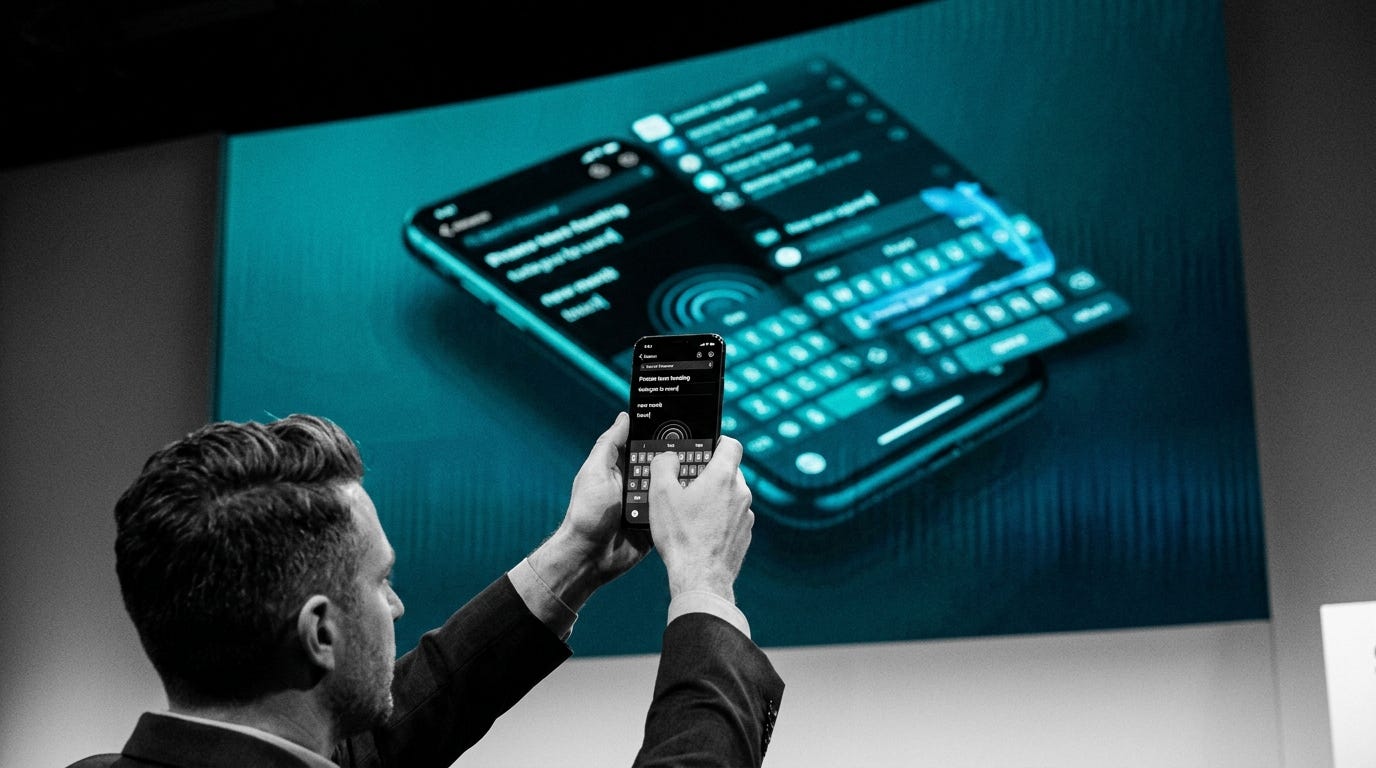
Phone demos still break in the dumbest ways. A founder needs to show a mobile flow on Zoom, the camera glare is awful, AirPlay lags, and every “screen mirroring” app seems to want an account, a watermark, or both. Meanwhile the actual need is painfully simple: get the Android screen onto a laptop fast, keep latency low, and let the keyboard and mouse work like they belong there. Scrcpy matters because it treats that job like a systems problem, not a growth funnel.
The Drop: The Mirror App Tax Nobody Asked For
Plenty of Android utilities promise remote control, but the category is weirdly bloated. You get companion apps that stay installed, cloud relay services for something happening two feet away, and desktop wrappers that feel like they were designed for IT departments in 2012. That friction shows up everywhere, from QA teams testing mobile builds to creators recording tutorials to anyone replying to messages faster from a real keyboard.
Scrcpy exists because Android already exposes enough plumbing through debugging tools to make direct control possible, yet almost nobody packaged that capability into something clean. The pain was not lack of access, it was bad product choices layered on top of access. Extra accounts. Extra software. Extra delay.
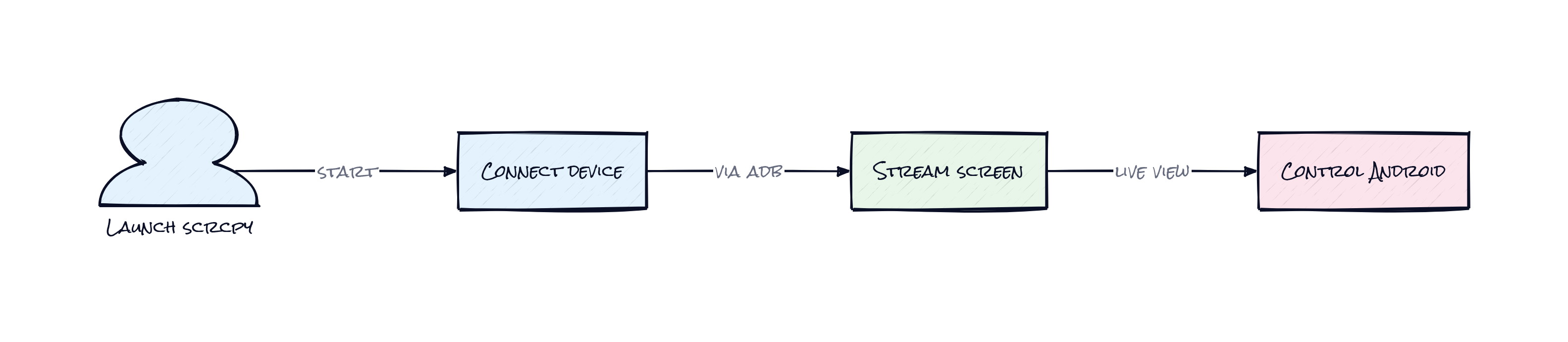
Genymobile’s answer is refreshingly blunt: no root, no permanent app on the phone, no internet requirement, no ad-tech nonsense. Just a direct path from device to desktop with low enough latency that the interaction stops feeling “remote.” That last part is the whole point. Once lag drops into the background, mirroring stops being a backup option and starts becoming the default way to manage an Android device from a computer.
The Stack: Native Speed, Not Electron Padding
Under the hood, Scrcpy is mostly C, with ADB handling the device connection, FFmpeg/libav decoding the media stream, and SDL2 rendering video and capturing desktop input. That combo is very intentional: native code for low overhead, proven media tooling for video and audio, and cross-platform desktop support without dragging in a heavyweight app shell.
The Sauce: A Temporary Agent Sitting on the Phone
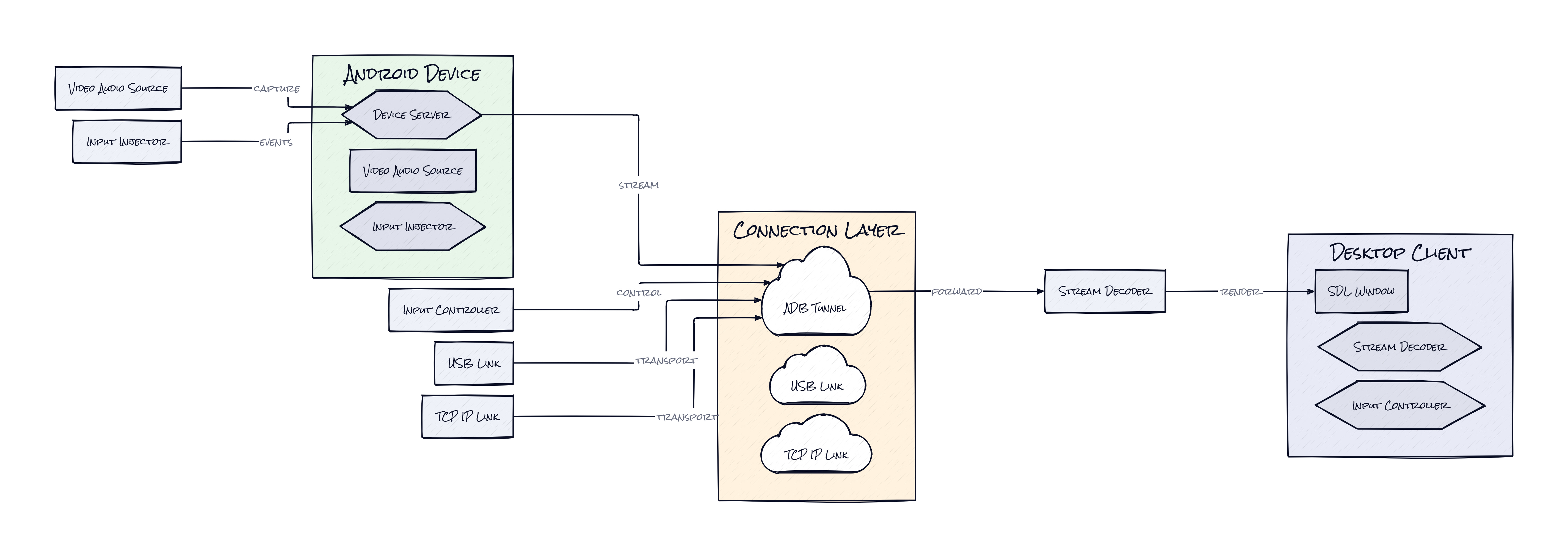
Instead of installing a full-blown companion app and building a persistent sync layer, Scrcpy pushes a tiny server onto the Android device at runtime, starts it, streams encoded video and audio back to the computer, then removes the footprint when the session ends. That architecture is why the whole thing feels so light. The phone does the capture and encoding close to the source, the desktop does the decoding and display, and control injection sends keyboard and mouse events back over the same session.
That split is clever because it optimizes for the bottleneck that actually matters: latency. Shipping compressed frames over USB or TCP is far cheaper than trying to screenshot, repackage, and relay through some generic desktop stack. Pair that with direct input forwarding and Scrcpy becomes less like “casting” and more like a transient I/O bridge between two operating systems.
The repo also keeps adding capabilities without breaking that core model. Audio forwarding extends the same low-latency session to sound. Virtual display creates a separate Android display that can launch apps independently of the physical screen, which is more interesting than it sounds because it turns one phone into a controllable multi-surface environment. There’s also camera mirroring, webcam exposure on Linux, HID support for physical keyboard and mouse simulation, and OTG mode for direct input control. Honestly, the interesting part is not any single feature. It’s that one tight transport architecture keeps absorbing adjacent jobs.
The Move: Turn One Phone Into Infrastructure
Product teams can use Scrcpy as a serious workflow upgrade, not a nerdy utility. A mobile PM can run app reviews from a laptop, record clean walkthroughs, and copy-paste test data between desktop docs and a real device without touching cloud mirroring software. QA teams can keep a rack of Android devices connected, switch between them quickly, and capture reproducible bugs with on-device fidelity and desktop ergonomics.
Creators and support teams get another angle. Tutorial videos look cleaner because the signal is direct, not re-recorded off glass. Customer success can mirror a client device during troubleshooting. Hardware startups can use OTG mode or HID simulation to test peripherals and gamepad flows without building custom tooling around every Android interaction.
Strategically, Scrcpy gives an organization something boring but valuable: control over the last mile of mobile interaction. No vendor dependency, no subscription pressure, no mystery cloud in the middle. For teams shipping mobile products, that compounds. Faster demos close deals. Faster testing shortens release cycles. Better recordings sharpen onboarding and support. The repo is free, but the advantage is operational speed.
The Aura: Computers Are Becoming Better Hands
Typing on glass is tolerated, not loved. The second a phone can be steered from a laptop with almost no friction, expectations change fast. People stop accepting the idea that mobile work must happen in a cramped, thumb-first interface, especially when the task is really research, messaging, testing, or presentation.
Scrcpy taps into a broader instinct: every screen should be accessible from the best available input surface. That sounds small, but it quietly chips away at device silos. Phones become endpoints in a wider personal computing setup, not sealed boxes demanding total attention on their own terms. That is the deeper behavioral shift here.
The Play: Open Source Owning a Utility Layer
This looks less like a 0-to-1 category creation and more like a brutally better mousetrap in a giant, under-monetized workflow market. TAM is broad because every Android-heavy org, from app studios to device labs to support teams, has screen-control pain, but monetization is tricky since the core job is solved extremely well in open source. The PMF signal is undeniable, though: 141,000-plus stars, strong fork activity, years of sustained maintenance, and a community that treats the repo like infrastructure. Moat is mostly execution speed and trust, not proprietary data, but trust matters a lot when the product touches devices directly.
Winners:
Relay.app: Lower-friction mobile control makes Android-based workflow automation easier to wire into business processes, which compounds as more operational tasks cross devices.
BrowserStack: Stronger demand for real-device testing and mirroring can lift higher-value enterprise usage where hosted labs, scale, and team collaboration matter.
Samsung: Better desktop-mediated Android usage reinforces the case for Galaxy devices in work settings, especially where phone-to-PC continuity already drives retention.
Losers:
Bezel: Consumer mirroring startups lose pricing power when a free, fast, deeply trusted option already nails the core screen-control job.
ApowerSoft: Paid utility suites get squeezed hardest because feature bundling is a weak moat once users realize the essential experience can be had without subscriptions or bloat.
TeamViewer: Legacy remote-access positioning looks less compelling for local mobile control, where lean direct-device tools outperform broad enterprise software.
tl;dr
Scrcpy turns an Android phone into something a laptop can display and control with almost no overhead. What’s clever is the temporary on-device server plus low-latency media transport, which keeps the experience fast without installing junk. Product teams, QA, creators, and anyone demoing mobile software should look.
Stars: 141,172 | Language: C
