

The Push: June 30th, 2026
Password profiling, AI red teaming, and model routing tricks for breaking assumptions and lowering AI costs


Cupp: Passwords Are Still Personal
github.com/Mebus/cupp | License: GPL-3.0

A breach drops, the leaked passwords hit a forum, and the depressing part is how many of them were probably guessable before any cracking rig spun up. Not because users are lazy, exactly. Because people keep baking their lives into secrets, birthdays, pet names, favorite teams, years, little substitutions that feel clever and are not. Cupp, short for Common User Passwords Profiler, sits right in that uncomfortable truth. This repo is less about brute force than about human predictability, which honestly makes it more interesting, and more unsettling.
The Drop: Security Fails at the Biography Layer
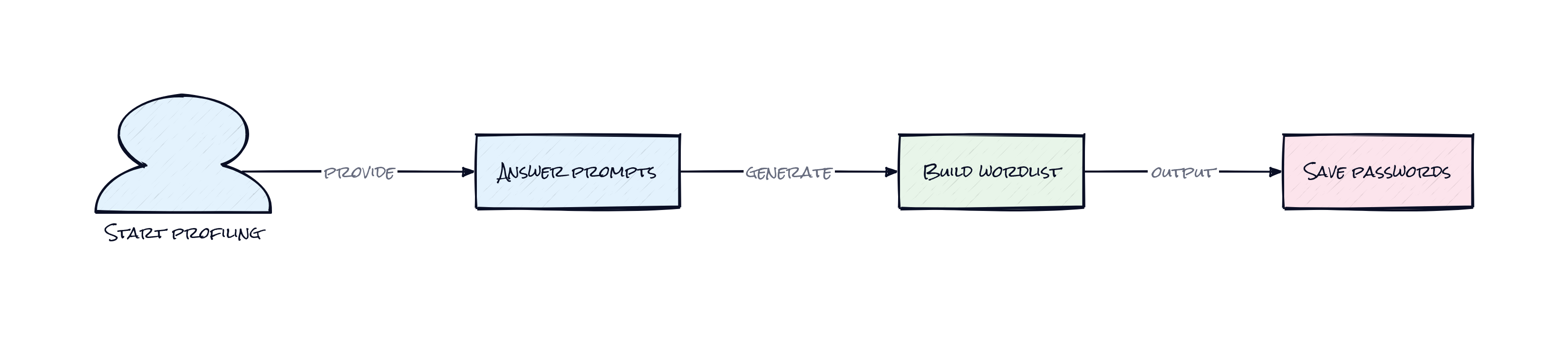
Plenty of security tools treat passwords like raw strings. Cupp treats them like social residue. That distinction matters.
A targeted password attack usually does not start with GPUs or some elite exploit chain. It starts with scraps, a first name, partner name, kid nickname, sports club, birth year, maybe a city or lucky number pulled from public profiles or internal recon. Human-chosen passwords are often tiny autobiographies with punctuation. Off-the-shelf wordlists miss that because they optimize for scale, not relevance. Generic lists are broad, but broad can be wasteful when the goal is one person, one org, one likely pattern.
Cupp exists for that gap. It asks for profile details, then turns those details into a custom attack dictionary that mirrors how people actually compose passwords: combinations, year suffixes, number ranges, special characters, and leet substitutions like swapping letters for symbols. There is also an interactive mode for building a profile from scratch, plus options to improve an existing dictionary and pull in larger public lists. The frustration driving this repo is simple: standard password testing often knows too little about the human at the keyboard.
The Stack: Small Script, Sharp Model
Under the hood, Cupp is a compact Python command-line tool with almost no framework baggage. Standard library pieces handle argument parsing, config loading, downloads, compression, and CSV processing, while a simple config file controls years, special characters, number ranges, and LEET mappings. That sparseness is part of the appeal, honestly.
The Sauce: A Password Generator That Thinks Like a Stalker
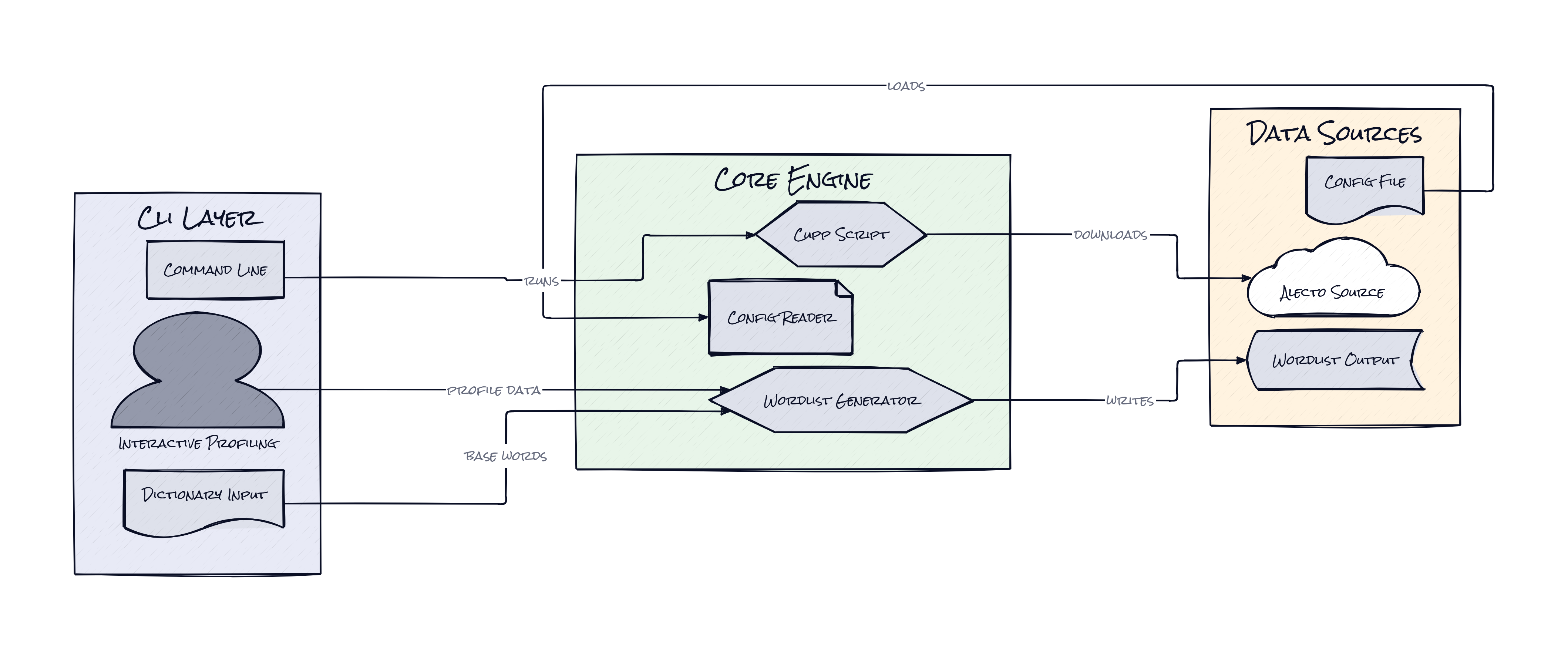
What makes Cupp interesting is not that it generates wordlists. Tons of tools do that. The notable design choice is that Cupp encodes a combinatorial profiling model, where personal attributes become structured inputs for a rule engine instead of loose notes for a pentester to improvise around.
Rather than dumping names into a text file and hoping for the best, Cupp creates layered permutations from profile fields, then systematically expands them with years, numeric ranges, special characters, and letter-to-symbol swaps. That architecture matters because it captures how password choice usually works in real life: users rarely invent from zero, they mutate familiar tokens. A child’s name becomes a root string. A wedding year becomes a suffix. An exclamation mark signals “security.” A leetspeak variant feels extra safe. Cupp operationalizes those habits.
The repo also separates global behavior into configuration, which is more important than it sounds. A pentester can tune years, thresholds, and character sets to fit a region, company, or campaign style without rewriting logic. That turns Cupp from a one-off script into a reusable attack grammar. The interesting part is not raw generation volume, it is biasing the search space toward human-likely guesses. In security, reducing irrelevant possibilities is often more valuable than adding more. Cupp understands that targeted attacks win by being narrower, not bigger.
The Move: Use It to Audit Human Weakness, Not Just Passwords
Used well, Cupp is not just a cracking accessory. It is a diagnostic tool for understanding how exposed an organization becomes when employee identity details are easy to collect.
Security teams can run internal assessments against corporate auth systems using profiles built from public-facing staff info, e.g. LinkedIn bios, company about pages, event speaker blurbs, or social handles gathered during approved tests. If those generated guesses land, the issue is bigger than bad passwords. It means staff are encoding discoverable personal context into credentials, which changes training, policy, and MFA rollout priorities. That is a strategic signal.
Founders and IT leads can also use Cupp as a stress test for onboarding policies. Take a sample set of common naming conventions, regional date patterns, and company slang, then see how easily those patterns translate into likely passwords. The result gives concrete evidence for password managers, SSO enforcement, and stricter auth defaults. Cupp is especially useful when the goal is proving that “strong enough” rules still fail against personalized guessing. Generic security theater looks thinner when a lightweight script can model employee behavior this closely.
The Aura: Secrets Keep Looking Like Selves
People do not pick passwords randomly, because identity keeps leaking into every convenience decision. That is the human lesson here.
Cupp exposes how often “private” credentials are assembled from public facts plus tiny flourishes. Once that becomes obvious, the expectation shifts. Security stops being a question of complexity checkboxes and starts looking like a behavioral design problem. Passwords fail when memory, emotion, and habit collide. Tools like Cupp make that collision visible, which is why they matter beyond pentesting. They remind teams that authentication is only as strong as the stories people cannot resist reusing.
The Play: Better Mousetrap, Real Demand
This is not a 0-to-1 category creator. Password auditing, offensive security, and credential testing are established markets. But Cupp demonstrates something enduring: targeted credential attacks still have real ROI because the underlying user behavior has not changed much. TAM sits inside the broader identity security and pentesting budget, with adjacent pull from MSSPs, red teams, and training vendors. PMF signals are steady rather than explosive, but 6,000-plus stars on an old, narrow tool suggests durable utility, not hype.
The moat here is not data or network effects. It is execution around workflow fit, trust, and security distribution. A startup that wraps this logic into enterprise policy checks, employee risk scoring, and auth remediation could build switching costs through reporting, integrations, and compliance workflows. Behavior change is sticky because companies do not stop caring about credential abuse once they see how personal the attack surface really is.
Winners:
Hanko: Lower CAC becomes plausible because passwordless auth pitches get sharper when personalized guessing remains trivially effective.
Huntress: Upmarket security expansion compounds as credential-risk insights slot naturally into managed detection and training motions.
Okta: Enterprise LTV strengthens because every proof point against passwords pushes more budget toward identity layers, MFA, and lifecycle controls.
Losers:
Passage: Differentiation erodes if developer-first auth products stay too focused on easy password flows instead of aggressively removing them.
1Password: Consumer growth narratives get pressured when enterprise buyers increasingly want identity orchestration, not just vault storage.
LastPass: Brand recovery gets even harder because any reminder of password fragility revives the case for abandoning password-centric habits entirely.
tl;dr
Cupp turns personal details into targeted password dictionaries, which is exactly why it feels a little brutal. The clever part is the structured profiling logic, not the wordlist generation itself. Security teams, founders, and anyone evaluating auth risk should look, especially if “strong password policy” still sounds reassuring.
Stars: 6,054 | Language: Python
