



Stirling PDF: Adobe’s Rent Looks Optional
github.com/Stirling-Tools/Stirling-PDF | License: Other

A signed contract lands in email, then a vendor asks for redaction, then finance wants the file compressed before upload, then legal needs OCR because the scan is basically a photograph with delusions of text. That tiny document chore somehow turns into four tabs, two subscriptions, and one privacy headache. Stirling PDF lands right on that pain: a surprisingly complete PDF workspace you can run in the browser, on desktop, or on your own server, without piping sensitive files through somebody else’s cloud.
The Drop: The Annoying File Format Everyone Still Needs
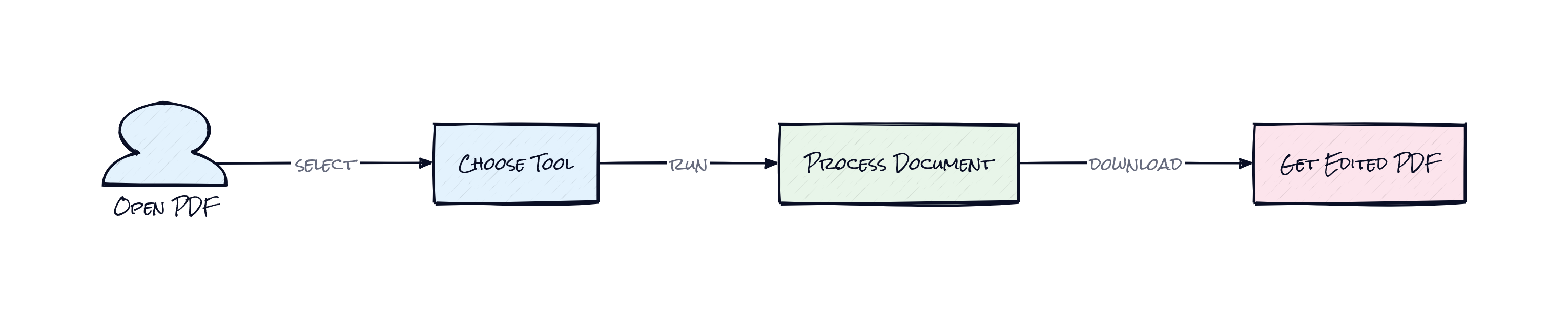
PDF software has been weirdly frozen for years. One app handles signatures, another handles conversion, a third does OCR, and the moment a document contains anything sensitive, the whole workflow starts feeling sketchy. Healthcare teams, legal ops, procurement, back-office finance, even startups doing customer onboarding all hit the same wall: PDFs are still the default wrapper for serious business, but the tools around them are fragmented, expensive, and often cloud-first in exactly the wrong way.
Stirling PDF exists because that gap is still huge. The repo bundles more than fifty document operations into a single place, not just editing and merging, but redaction, compression, format conversion, OCR, signing, and workflow automation. The point is not novelty. The point is removing the tax of stitching together random SaaS utilities every time a file needs one more step.
Plenty of products claim to “simplify PDFs.” Usually that means a clean UI over a narrow use case. Stirling PDF goes after the uglier reality, where one file moves through compliance, storage limits, searchability, and approvals before anyone is done with it.
The Stack: TypeScript Up Front, Java in the Engine Room
Under the hood, Stirling PDF mixes a TypeScript front end with a Java back end, packaged for browser use, desktop distribution, and self-hosted deployment. Docker is a first-class path, and the project layers in enterprise-friendly pieces like API access, authentication options, and OCR support, which matters because document processing only gets sticky when it fits existing systems.
The Sauce: A PDF Tool Suite That Thinks Like Infrastructure
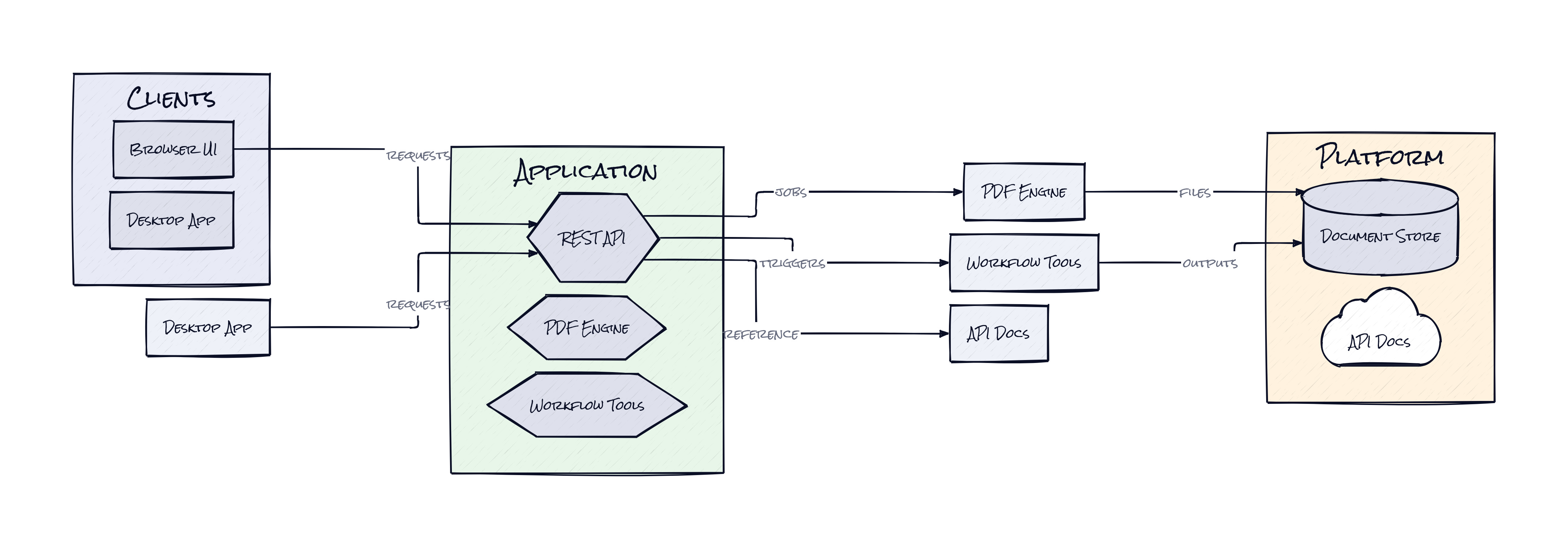
What makes Stirling PDF interesting is not that it has a long feature list. Lots of software accumulates buttons. The architectural move here is turning document handling into a platform surface instead of a one-off utility. The same core capabilities show up across a web app, a desktop client, and a self-hosted server with a private API, which means the product is designed less like “an editor” and more like shared document infrastructure.
That matters because PDFs are rarely a standalone task. A contract might need OCR before indexing, redaction before external sharing, compression before storage, and a signature before archiving. Stirling PDF’s workflows package those steps into repeatable pipelines, including a no-code layer in the UI and API access for automation. Honestly, that is the interesting part. The repo treats PDFs as process nodes inside a business system, not as files somebody manually pokes at.
The second clever decision is deployment symmetry. Self-hosted mode is not a side option tucked behind enterprise sales. It is central to the product thesis. That changes the trust model completely for organizations handling customer records, legal documents, or internal financial material. Instead of asking teams to accept cloud exposure for convenience, Stirling PDF offers convenience because the processing can stay inside company boundaries. Think Notion’s flexibility, but aimed at document operations where data residency and auditability actually decide the purchase.
The Move: Put Boring Documents on Rails
Teams should read Stirling PDF less as a replacement for a single Adobe screen and more as a way to standardize every repetitive document step that quietly burns time. A startup handling sales contracts can self-host it and expose a private API to automate redaction and signature prep. An operations team can build internal flows for OCR plus compression plus archive-ready naming. A founder running lean can stop paying for three overlapping PDF tools that all solve part of the same problem.
Another smart use is product adjacency. If a company already ingests documents, e.g. expense reports, onboarding packets, claims forms, or compliance uploads, Stirling PDF can become the processing layer behind the user-facing app. That is where the strategic advantage shows up. Instead of treating document transformation as outsourced plumbing, the business gets control over reliability, privacy, and per-file economics.
Open source also changes procurement math. A team can test real workflows internally before talking to anyone in sales, then decide whether self-managed is enough or whether enterprise features are worth paying for. That shortens evaluation cycles and reveals actual fit fast.
The Aura: People Expect Documents to Behave Like Software
Nobody wants to “manage PDFs.” People want files to be searchable, editable, signable, compliant, and private by default. That expectation used to belong to power users and IT admins. It now belongs to everyone handling serious digital paperwork.
Stirling PDF taps into that broader behavioral shift. Documents are no longer passive attachments. They are operational objects that need permissions, automation, and clean handoffs. Once teams get used to controlling that stack themselves, the old model, uploading sensitive files into random browser tools and hoping the output looks right, starts to feel oddly primitive.
The Play: Open Source Wedge, Enterprise Budget Line
From a VC lens, this looks less like a pure 0-to-1 category creation and more like a ruthless unbundling play inside a massive, boring, high-spend market. The TAM is huge because PDFs sit inside legal, healthcare, finance, education, government, and horizontal back-office software. With 82,713 stars, strong Docker distribution, and a self-hosting story that maps directly to compliance pain, the repo shows real PMF signals. The moat is probably not deep algorithmic IP. It looks more like distribution, community trust, workflow embedding, and switching costs once teams wire document processing into internal systems.
Winners:
Breezeworks AI: Lower document-processing overhead makes it easier to build vertical workflows around forms and service records, and that compounds because small teams can ship compliance-heavy features sooner.
Rippling: More demand for private, automatable document operations strengthens platforms that orchestrate employee paperwork across systems, where LTV rises with every embedded workflow.
DocuWare: Faster adoption of self-hosted PDF infrastructure expands the market for broader document management suites that sit above raw file manipulation.
Losers:
PandaDoc: Margin pressure grows when core PDF handling becomes easier to self-host, and adaptation is hard if premium pricing leans on packaging familiar document actions.
Dropbox: Standalone file storage looks thinner when customers expect built-in transformation, OCR, and redaction instead of exporting documents into separate tools.
Adobe: Seat expansion gets harder at the lower end when open-source alternatives cover the everyday workflow stack well enough for startups, ops teams, and privacy-sensitive orgs.
tl;dr
Stirling PDF turns PDF work from a scattered set of subscriptions into a single self-hosted platform for editing, OCR, redaction, signing, conversion, and automation. The clever part is the infrastructure mindset: one core engine across UI, desktop, server, and API. Worth a look for ops-heavy teams, founders, and anyone sitting on document workflows with privacy constraints.
Stars: 82,717 | Language: TypeScript
